Docs › Tasks and projects
Example: plan a website launch
From an empty project to a scheduled week — a worked example that uses boards, checklists, people, the calendar and a rule.
Sam's studio is relaunching a client's website in three weeks. Here's how the whole thing comes together in Daykite, start to finish.
1. Create the project
Projects → New project.
- Name: Website relaunch
- Space: Northwind
- Description: New site live before the autumn campaign.
Create project. It opens on the Board with one list, To do.
2. Shape the board
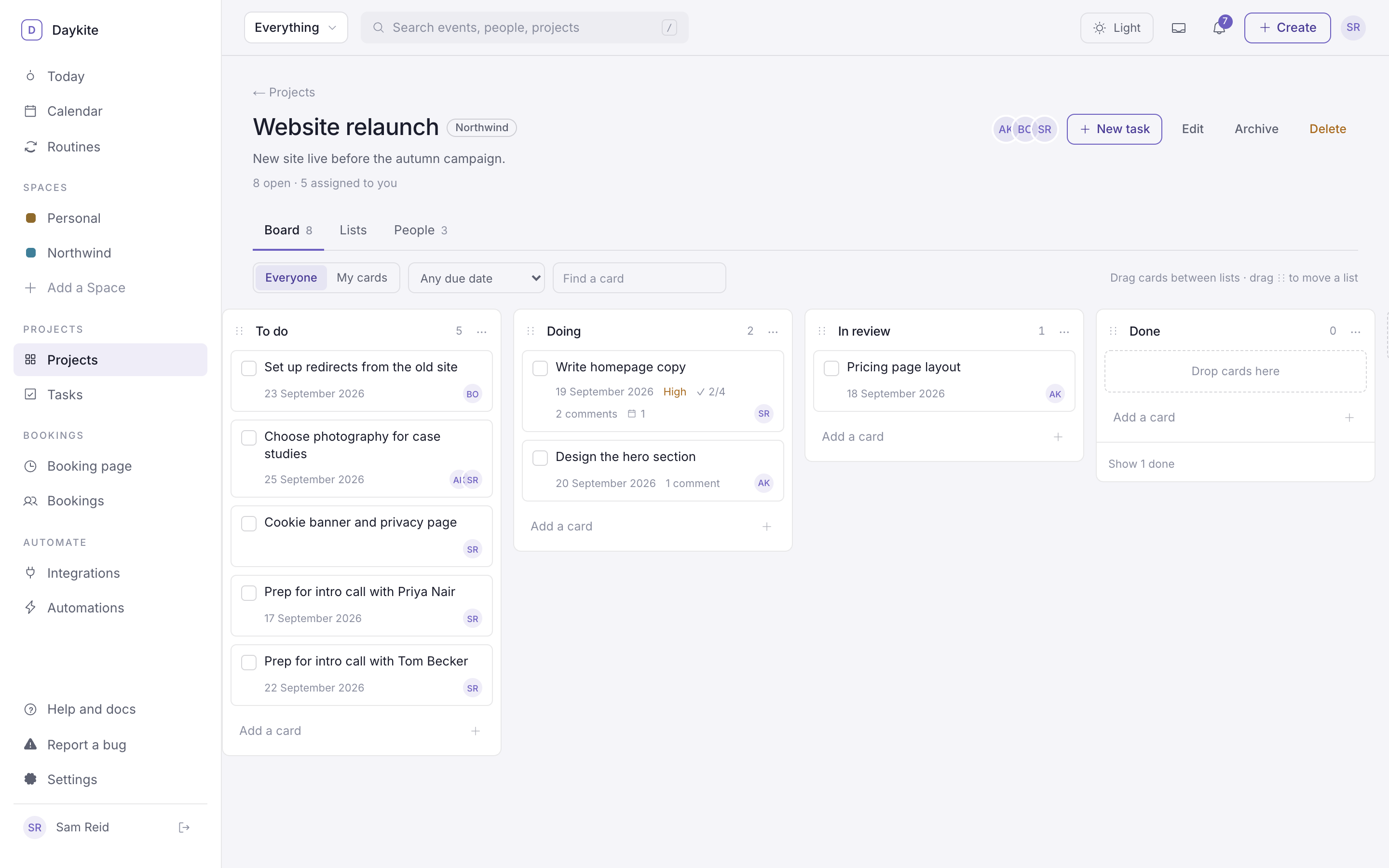
Add three lists with Add a list: Doing, In review, Done. The board now reads left to right like the work does.
3. Bring in the team
On People, choose Add someone from the Space… → Aisha Khan → Add to project, then the same for Ben Ortiz. Aisha leads the design, so choose Make lead beside her name — she can now manage the project too.
4. Add the work
Type cards straight into the lists:
| List | Card | Assigned to | Due | Estimate |
|---|---|---|---|---|
| To do | Set up redirects from the old site | Ben | in 6 days | 1h 30m |
| To do | Choose photography for case studies | Aisha, Sam | in 8 days | 1h |
| Doing | Write homepage copy | Sam | Saturday | 3h |
| Doing | Design the hero section | Aisha | Friday | 4h |
| In review | Pricing page layout | Aisha | tomorrow | 2h |
Set High priority on Write homepage copy — it's blocking the design.
5. Break a task down
Open Write homepage copy. Under Checklist, add:
- Headline and subheading
- Three benefit blocks
- Call to action
- Get Aisha's sign-off
6. Talk in the task, not in chat
Aisha comments on Write homepage copy: "@Sam Reid can we keep the headline under eight words so it fits the hero?" Sam gets a notification and replies right there. Three weeks later, anyone can open the task and see why the headline is short.
7. Put the work in the week
Open the calendar in Week view and the Tasks panel. Drag Write homepage copy onto Wednesday 09:00 and trim it to 11:00. Make that block a protected focus block by opening it and ticking Protect this time — keep meetings out of it. If a colleague invites Sam to something at 10:00, Daykite declines it.
On Wednesday, Sam opens the task and chooses Start focus. At 10:45, Stop & log.
8. Let the board tidy itself
Automations → Move finished tasks to Done → Use this, then:
- Trigger: A task is completed → Only in this project Website relaunch
- Step: Move the task to a list → Website relaunch → Done
Switch it On.
Now ticking a task anywhere — the board, Today, a calendar chip — moves its card to Done.
9. Keep everyone informed
Open the same automation, select the move step, and add + Action → Notify me — Done: {task.title} 🎉. It runs
right after the card moves. Small, but it makes progress visible.
10. When it's live
Choose Archive at the top of the project. It leaves the Projects list and everyone's task lists, and waits under Archived if anyone needs to look back.