Docs › Routines
What a routine is
Routines are the shape you want your days to have — a plan that sits beside your calendar, never in its way.
Some time isn't a meeting. It's the walk before breakfast, the school run, the half hour at five when you clear your inbox and plan tomorrow. You want it on your radar, but you don't want it blocking anyone from booking you.
That's a routine: a named set of periods that repeat on chosen days.
| Routine | Days | Periods |
|---|---|---|
| Morning | Weekdays | Walk 07:00–07:30 · Breakfast and reading 07:30–08:10 |
| School run | Weekdays | Drop-off 08:15–08:45 · Pick-up 15:15–15:45 |
| Wind down | Weekdays | Inbox zero and tomorrow's plan 17:00–17:30 |
How routines differ from events
| Routine period | Event | |
|---|---|---|
| Where it shows | A thin coloured rail beside each day on the calendar, and a checklist on Today | A block on the calendar |
| Blocks time? | No — it's a plan. Meetings and bookings can still land in it. | Yes, it's busy |
| Guests | None — it's yours | Can have guests |
| Tracking | Mark each period done or skipped for the day | — |
| Changing one day | Move it for that day only, without touching the routine | Edit the event, or one occurrence |
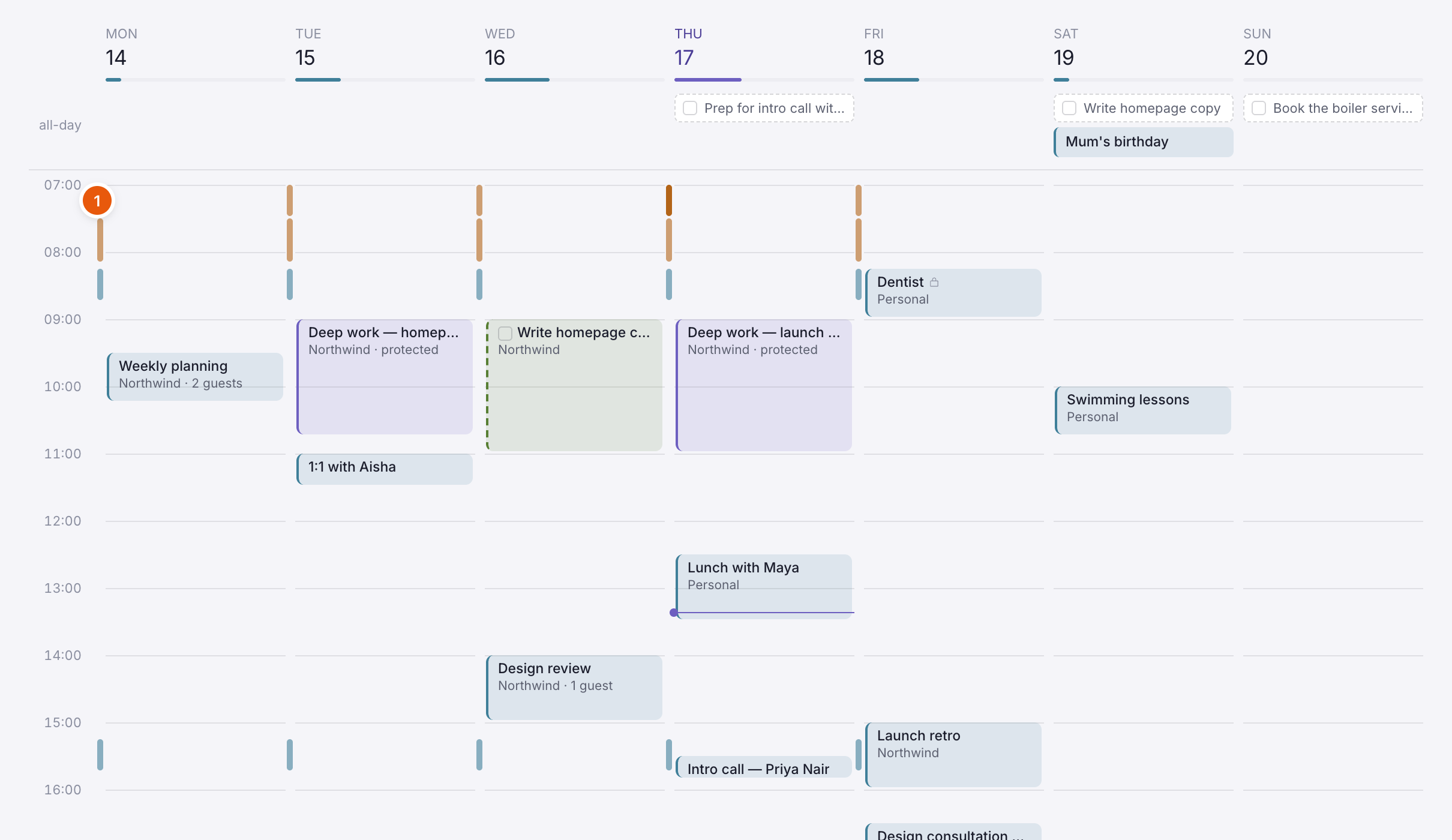
Where you'll see routines
- On the calendar (Day, Week and Today), as a thin rail just left of each day. A planned period is half-strength, a done one is solid, and a skipped one is faint. Choose a rail to open its popover.
- On Today, in the Routines card — every period for today with a tick box and "1 of 5 done", its tasks to tick off, and a suggested new time when an event lands on it.
- On the Routines page, grouped into Personal and Work, with "1 of 2 done today" for each.
Why "personal" and "work"?
Each routine has a kind. It groups the Routines page, and lets you see at a glance which parts of the day are yours and which belong to work. It doesn't change who can see the routine — routines are always private to you.
Routines and automations
Marking a period done or skipped can start an automation — for example, when "Walk" is skipped, add a reminder for a lunchtime walk.
Next: Create a routine.