Docs › Integrations
Gmail
Send email from your own address in automations, and turn a labelled message into a task that links back to the thread.
Experimental. Integrations are still being tested. They may not run, or may give incomplete or wrong results — check anything important yourself, and tell us what goes wrong.
Connecting Gmail does two things:
- Automations send email from your Gmail address, and it lands in your Sent folder.
- Labelled mail becomes tasks. Put a label on a message in Gmail and a task appears in Daykite, with a link back to the thread.
Connect
Integrations → Gmail → Connect Gmail. Google asks for permission to send mail and to read and label messages. If Google Calendar is already connected, it's the same Google account and connection — nothing you had before is lost.
Send email from automations
Nothing else to set up. Any automation with a Send an email step now sends from your Gmail address:
When a booking is made → Send an email to
{guest.email}, subjectSee you soon, {guest.name}.
Without Gmail connected, the same automation sends from Outlook mail if that's connected, or otherwise from Daykite. See Every trigger and action.
Turn labelled mail into tasks
- In Gmail, create a label — Daykite is a good name.
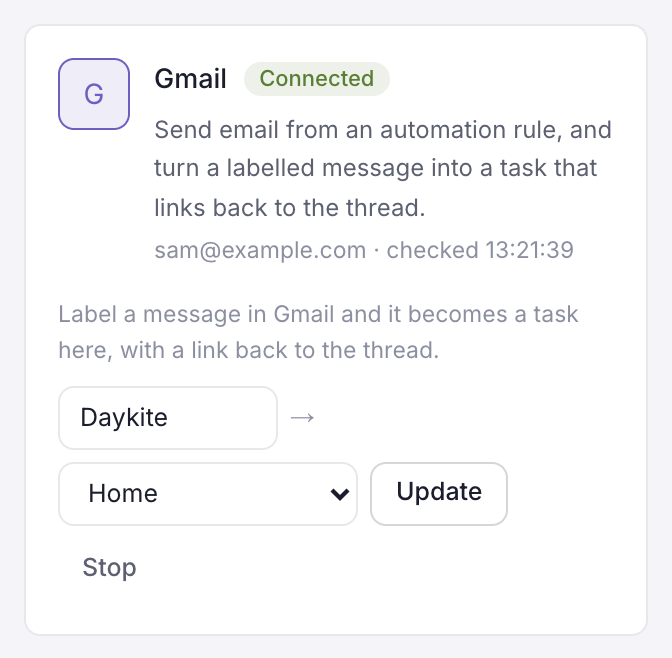
- In Daykite, on the Gmail card, type the label's exact name, choose which of your own lists the tasks go into, and choose Watch.
- Label any message in Gmail. Within a minute it's a task in that list, titled with the email's subject, with the sender and a preview of the message in its notes.
- The task keeps a link — Open the email it came from ↗ on the task's page.
- The label is taken off the message once it's filed, so each message becomes one task.
- Update changes the label or list; Stop stops watching.
- The card shows when Gmail was last checked, and any problem — like Gmail has no label called "Daykite".
Privacy
Daykite only looks at messages that carry the label you chose, and only reads their subject, sender and Gmail's short preview line — those become the task's title and notes. It doesn't read or keep the rest of your mailbox.