Docs › Calendar
Focus time and the focus timer
Block time for deep work, keep meetings out of it, and track the minutes you actually spend.
Daykite treats focus time as something worth defending. There are two parts: focus blocks on your calendar, and the focus timer that runs while you work.
Focus blocks
A focus block is an event of type Focus. Create one from Create → Event, then set What are you adding? to
Focus — or type straight into the plain-English line: Deep work tomorrow at 9 for 2 hours.
Focus blocks are different from ordinary events:
- They're protected. With Protect focus blocks on in Calendar settings (it is to begin with), an invitation that lands inside one is declined for you. You get a notification — "Declined automatically: Budget sync. It lands in your protected focus time" — and you can still open it and accept.
- They're private by default. Others see Busy only unless you choose otherwise.
- They count as busy. Find a time and your booking page never offer them.
- They show up on Today as hours of focus: "3 meetings, 2h of focus."
Any event can be protected: open it and tick Protect this time — keep meetings out of it.
The focus timer
Start a session and a small timer floats in the bottom-right corner of every screen while you work.
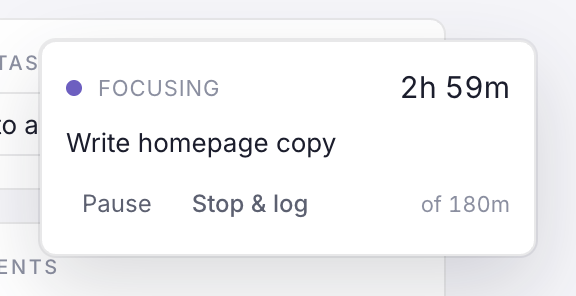
Start one:
- On the calendar, choose the clock button in the toolbar. It starts a 50-minute Deep work session.
- On a task's page, choose Start focus. The session is tied to the task and counts down its remaining estimate.
While it runs:
- It counts down. Once you pass the planned time it keeps going, shown as +05:12 in amber, so you know you've gone over without being cut off.
- Pause and Resume as often as you need; paused time doesn't count.
- It keeps running if you close the tab — open Daykite again and it's still there.
When you stop:
- Stop ends a plain session.
- Stop & log ends a task session and counts the minutes against the task's estimate. The task's Activity notes the session, and the time left is what the next focus session — or Add to calendar — uses.
Only one session runs at a time. Stop the current one before starting another.