Docs › Calendar
Repeating events
Set an event to repeat, choose when it stops, and change or cancel one of the series without touching the rest.
A weekly 1:1, a monthly invoice run, a birthday — set it up once and Daykite fills in every one.
Make an event repeat
In the event form, open Repeat. The choices are built from the day the event starts on. For an event on Tuesday 15 September they read:
| Choice | Repeats |
|---|---|
| Every day | Daily, weekends included |
| Every weekday | Monday to Friday |
| Every Tuesday | Weekly, on the same day |
| Every other Tuesday | Fortnightly |
| Monthly on the third Tuesday | Same weekday, same week of the month |
| Monthly on day 15 | Same date each month |
| Every year | Same date each year |
| Custom… | Anything else — see below |
Under the menu, Daykite describes the rule in words so you can check it — "Every week on Tuesday, until 18 December 2026."
Choose when it ends
Once an event repeats, an Ends menu appears:
- Never — it carries on.
- On a date — the last day it can happen. Starts three months out; change it to whatever you need.
- After a number of times — for example 6 times for a six-week course.
Custom repeats
For patterns the menu doesn't offer, choose Custom…. A box appears with a starting rule; edit it using the standard calendar format (the one Google Calendar and Outlook use too):
| Rule | Means |
|---|---|
FREQ=WEEKLY;BYDAY=TU,TH |
Every Tuesday and Thursday |
FREQ=WEEKLY;INTERVAL=2;BYDAY=MO,WE |
Every other Monday and Wednesday |
FREQ=MONTHLY;BYDAY=FR;BYSETPOS=-1 |
The last Friday of every month |
FREQ=MONTHLY;BYMONTHDAY=1,15 |
The 1st and 15th of each month |
Daykite understands FREQ (daily, weekly, monthly or yearly), INTERVAL, BYDAY, BYMONTHDAY and BYSETPOS.
Other parts, like BYMONTH, aren't supported yet. Check the description under the field — it tells you how Daykite
has read your rule.
Use Ends for the end date or count rather than typing UNTIL or COUNT yourself.
Repeating events keep their wall-clock time when the clocks change: every weekday at 09:00 stays at 09:00 through summer time.
Change or cancel one of a series
Open any one of the series and change it as usual. When you save — or choose Cancel event — Daykite asks which events you mean:
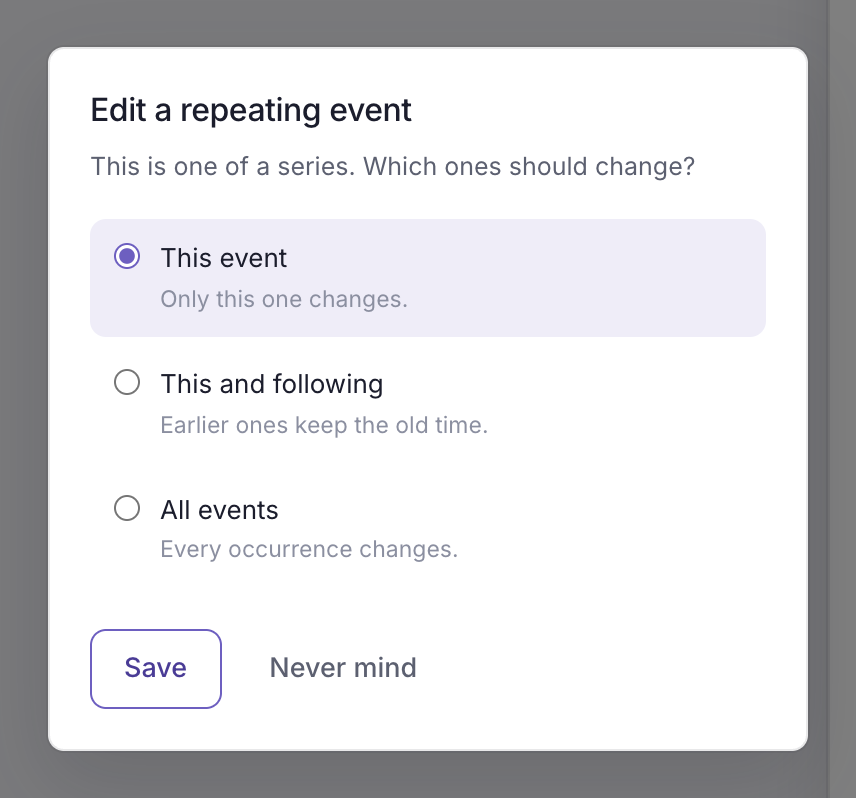
| Choice | When you save changes | When you cancel |
|---|---|---|
| This event | Only this one changes | Only this one is cancelled; the rest stay |
| This and following | This one and every later one change; earlier ones keep the old time | This one and every later one are cancelled; earlier ones stay |
| All events | Every one changes | The whole series is cancelled |
If you changed the Repeat rule itself, This event isn't offered — a single event can't have its own repeat pattern. Choose This and following to change the pattern from here on, keeping the history as it was.