How to Plan Your Day When Your Calendar Is Already Full
Seven meetings, no gaps, and a deadline anyway. How to triage a packed calendar, find usable time between meetings and still finish the one thing that matters.
The Daykite team7 min read
You open your calendar at 08:45 and it's already over. Seven meetings, back to back, from 09:30 to 17:00. Somewhere in there you also need to finish the client proposal that's due tomorrow. There is, apparently, no time.
There's almost always some time. It's just hidden in the wrong places: a meeting that could be 25 minutes instead of 60, a status call you don't need to attend, three 15-minute gaps that each look too small to use. This guide shows how to find that time and spend it on what matters.
Step 1: Decide what today has to produce
Before touching the calendar, answer one question: if only one thing got done today, what should it be?
Not five things. One. On a full day, that single outcome is what you'll protect. Everything else is a bonus.
Write it down where you'll see it — the top of your notes, a sticky note, the title of a calendar block.
Step 2: Triage every meeting
Go through the day's meetings one by one and put each in a bucket:
| Bucket | Question | What to do |
|---|---|---|
| Essential | Does it need me, today, in full? | Keep it |
| Shorten | Could it be done in half the time? | Ask to end early, or join for the part that needs you |
| Delegate | Could someone else represent me? | Send them, ask for notes |
| Decline | Would anything bad happen if I weren't there? | Decline politely, ask for a written update |
| Move | Does it have to be today? | Offer another day this week |
Aim to free at least one block of 45 to 60 minutes. That's enough to make real progress on your one thing.
A quick, friendly message usually works:
"I'm on a deadline today — could I send my update in writing instead? Happy to join next week."
Step 3: Find the hidden gaps
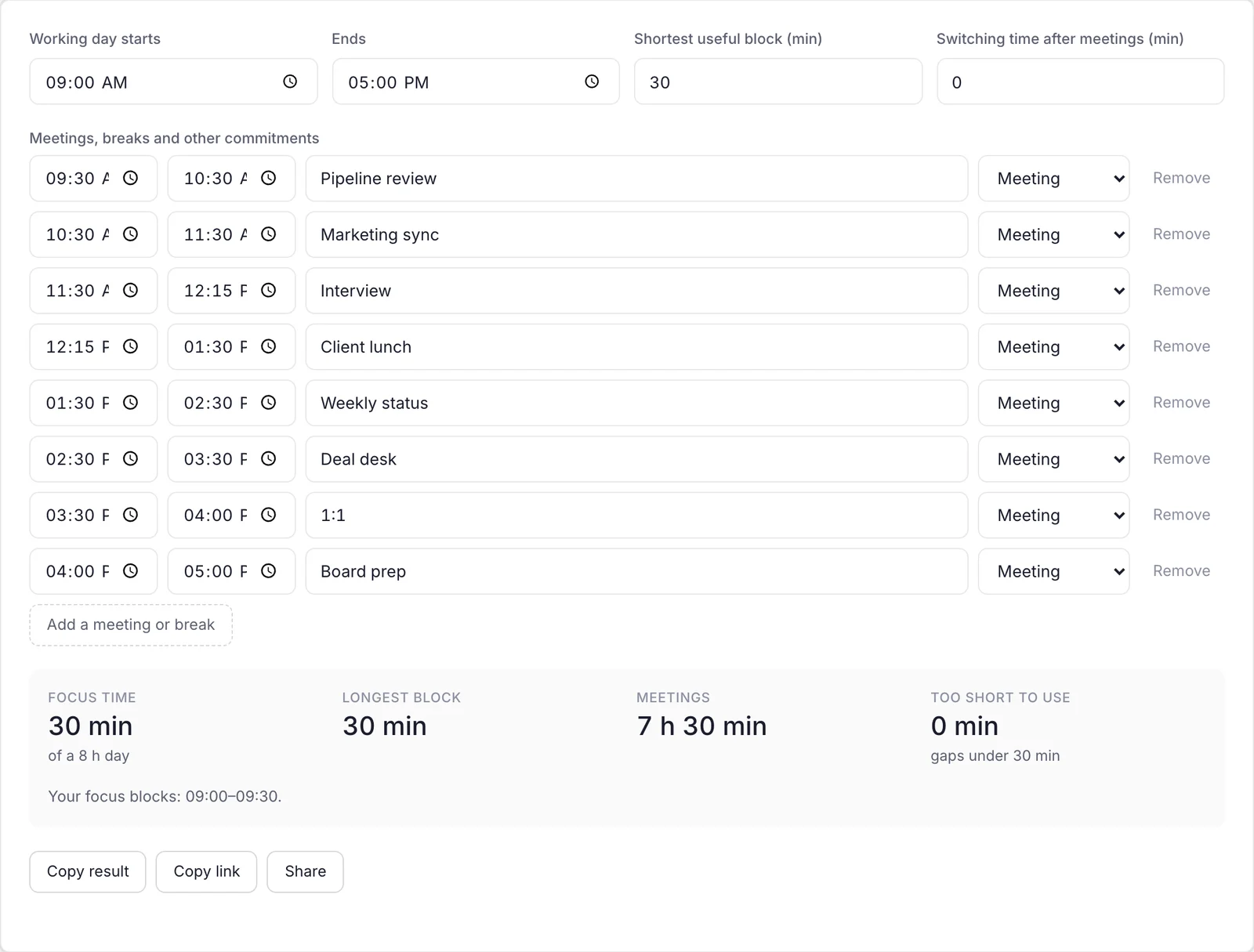
Once the triage is done, look at what's left between meetings. You'll typically find three kinds of time:
- A real block — 45 minutes or more. This goes to your one thing.
- Short gaps — 15 to 30 minutes. Good for small, bounded tasks.
- Crumbs — under 15 minutes. Good for a single reply, a stretch, a glass of water.
The free Focus Time Calculator does this sorting for you: enter your meetings and breaks, and it shows your longest uninterrupted block and how much usable focus time the day really has.
Step 4: Match tasks to gap sizes
Now fill each gap with a task that fits it — rather than starting something big in a 15-minute window and never finishing:
- 45–60 minutes: the one thing. Close everything else.
- 20–30 minutes: a review, a short draft, a batch of three or four replies.
- 10–15 minutes: approve an expense, book a room, confirm a time.
Batching matters. Five replies in one 20-minute gap is far faster than five replies scattered across the day, each interrupting something else.
Step 5: Protect the freed time immediately
The hour you freed in Step 2 is valuable — and invisible to everyone else. If you don't claim it, someone will book it by lunchtime. Put a block on the calendar right away, named after the work: Proposal — final draft. Mark it busy.
Step 6: Plan tomorrow before you leave
A day like this usually means tomorrow is full too. Spend five minutes at the end of the day looking at tomorrow's calendar and applying the same triage while there's still time to decline politely.
A real example: Marcus's Wednesday
Marcus is a sales director. On Wednesday morning his calendar looked like this:
- 09:30 Pipeline review (60 min)
- 10:30 Marketing sync (60 min)
- 11:30 Candidate interview (45 min)
- 12:15 Lunch with a client (75 min)
- 13:30 Weekly status (60 min)
- 14:30 Deal desk (60 min)
- 15:30 1:1 with a new rep (30 min)
- 16:00 Board prep (60 min)
His one thing: the renewal proposal for the company's biggest customer, due at 09:00 Thursday.
Triage:
- Marketing sync → delegate to his deputy, who sends notes.
- Weekly status → decline, send a written update.
- Pipeline review → shorten to 30 minutes.
Result:
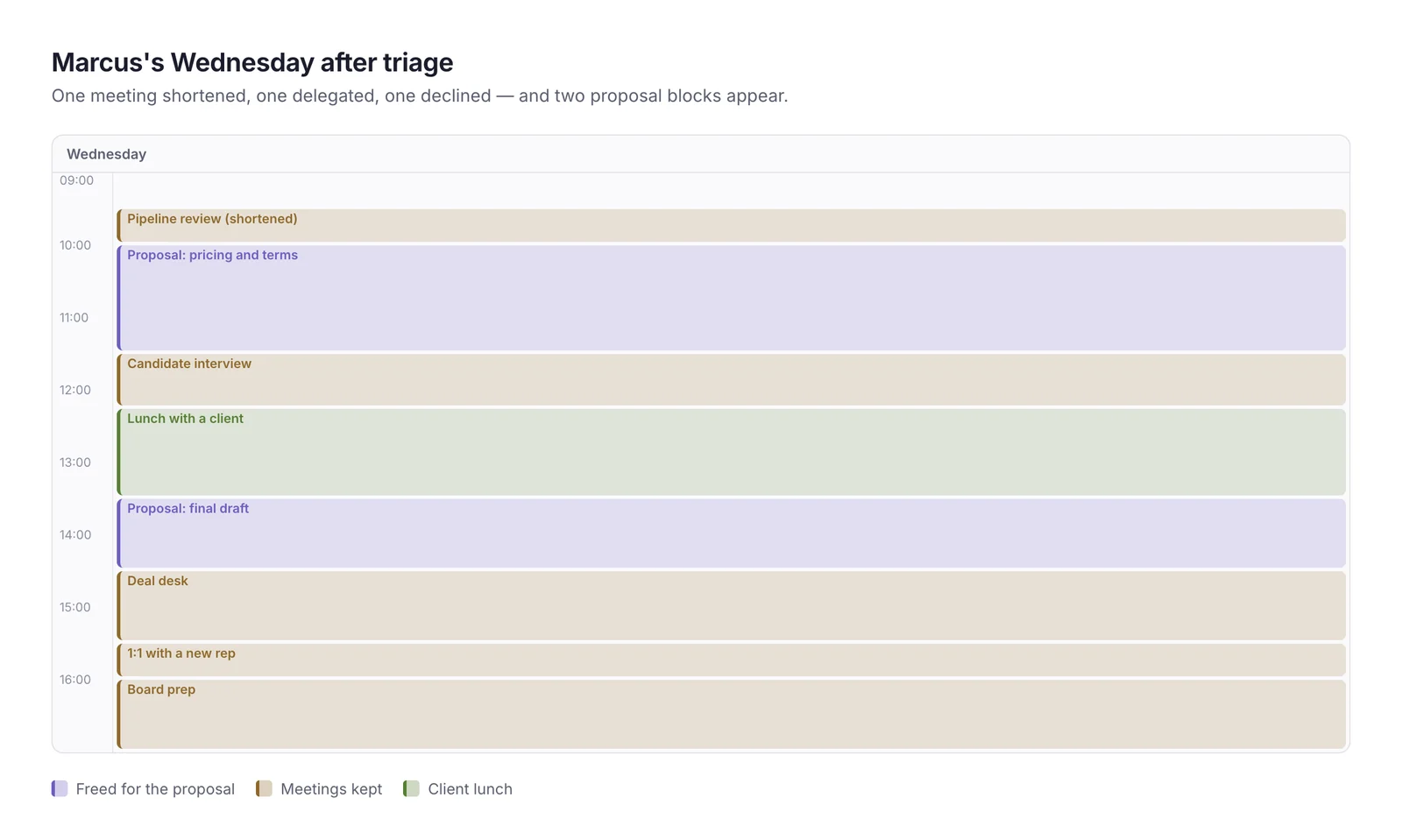
- 10:00–11:30 — Proposal: pricing and terms (freed by shortening the review and delegating the sync)
- 13:30–14:30 — Proposal: final draft (freed by declining the status meeting)
Two and a half hours of real work, found in a day that had "no time". The proposal went out at 17:30 — and none of the three meetings he changed was missed by anyone: the deputy's notes and the written update covered them completely.
Getting more from the meetings you keep
Triage removes some meetings; the rest still take most of your day. You can make them cost less:
- Arrive with one question. Before each meeting, write down the one thing you need from it. When you have the answer, you can often leave early.
- Ask for the agenda. A meeting without one is a good candidate to shorten: "Can we cover the pricing question in 20 minutes?"
- Take action notes in the meeting. Two lines — what was decided, what you'll do — saves 15 minutes of reconstruction later.
- Leave the last five minutes to capture. Ending at :55 instead of :00 gives you time to note decisions before the next call starts.
- Do tiny follow-ups immediately. If a reply takes two minutes, send it before the next meeting rather than adding it to the evening pile.
These habits don't make the day less full, but they stop meetings from leaking into your evening as follow-up work.
Common mistakes
- Trying to do five important things. On a full day, pick one.
- Accepting every meeting by default. Triage takes ten minutes and often saves two hours.
- Using short gaps for big tasks. Starting a big task in 15 minutes usually means restarting it later.
- Not claiming freed time. An hour you freed but didn't block will be booked by someone else.
- Skipping lunch to make time. It works for a day and costs you the afternoon. Protect a short break.
Taking it further
If full days are the norm rather than the exception, the problem is upstream of today:
- Set meeting windows so meetings cluster in certain hours and focus time survives elsewhere — see how to protect focus time on your calendar.
- Audit recurring meetings once a quarter and cancel the ones that have outlived their purpose.
- Use a time-blocking template so every week starts with focus time already in place. Time blocking examples has seven to copy.
Where automation helps
- A daily summary each morning showing meetings, free time and the tasks that don't fit
- An assistant that finds time for a task in today's gaps and proposes blocks for you to confirm
- Automatic declines for meetings that land in protected focus time
How Daykite helps
Daykite's assistant has a Plan my day button: it shows today at a glance and fits your most pressing tasks into today's free time, each as a suggestion you confirm — nothing changes until you do. Find overload flags the days with too many meetings before they arrive, and Time Insights shows how much of your week meetings really take, compared with the week before. See using the assistant for everything it can do.
Frequently asked questions
How do I get work done when my calendar is full of meetings?
Choose one outcome for the day, triage your meetings to free at least one 45–60 minute block, protect that block immediately, and use short gaps for small batched tasks.
How do I decide which meetings to skip?
Ask whether the meeting needs you, today, in full. If not, shorten it, send someone else, ask for a written update or move it to another day.
What can I do in a 15-minute gap?
Small, finishable tasks: a couple of replies, approving an expense, booking a room, confirming a time. Avoid starting large tasks you can't finish.
How do I stop my days from filling up with meetings?
Set meeting windows, protect focus blocks in your best hours, and review recurring meetings regularly. A weekly planning session helps you spot full days before they arrive.
What if my manager won't let me skip meetings?
Ask about one specific meeting rather than meetings in general: "Could I send a written update for Wednesday's status call so I can finish the proposal?" Specific, time-limited requests are much easier to agree to.
How do I plan tomorrow if it's already fully booked?
Do the same triage the evening before, while there's still time to decline or move meetings politely. Pick tomorrow's one outcome, free one block for it, and put that block on the calendar before you log off.
Is it rude to decline meetings?
Not if you reply quickly, explain briefly and offer an alternative — a written update, a delegate or another time. Most people prefer a clear answer to a distracted attendee.
daily planningbusy scheduletoo many meetingsprioritizationtime management
Comments