How to Use a Time Zone Converter for International Meetings
Convert one meeting time for several cities at once, spot who's outside working hours, catch date changes and daylight saving shifts, and share the answer as a link.
The Daykite team7 min read
"Let's meet at 10 my time" is the most common sentence in international scheduling — and the start of most time-zone mistakes. Somebody converts it in their head, gets it an hour wrong because of daylight saving, and joins an empty call.
A time zone converter removes the arithmetic. But the tool only helps if you use it well: with the right cities, the right date, and an eye on the things that trip people up. This guide shows how, with real conversions you can check.
What a time zone converter actually does
A good converter takes three inputs:
- A starting time — the proposed meeting time.
- A starting place — whose clock that time is on.
- A date — because the answer changes during the year.
It then shows the same moment in every other city you add. The best converters also tell you whether each local time falls in working hours, early morning, evening or the middle of the night, and whether the date is different.
That third input — the date — is the one people forget. The difference between two cities isn't a fixed number of hours; it depends on the day. More on that below.
Step-by-step: converting a meeting time for several cities
1. Start from the organizer's city
Enter the time the meeting is proposed in, in the city where it was proposed. If your colleague in New York says "10:00", start from New York, not from your own city — that avoids converting twice.
2. Add every attendee's city — by name
Add each city where someone will join. Use city names, not abbreviations: "CST" can mean US Central Time or China Standard Time, and "IST" can be India, Ireland or Israel. A city is never ambiguous.
3. Set the actual date
Always set the real meeting date. A converter that assumes "today" gives a wrong answer for a meeting three weeks away if a daylight saving change falls in between.
4. Read the badge, not just the number
Look at what kind of time each city gets:
- Working hours — fine.
- Early morning or evening — possible, but ask first.
- Sleeping hours (22:00 to 07:00) — not acceptable except in emergencies.
5. Check the date column
A 10:00 meeting in New York is already the next day in Sydney. If you write "see you Tuesday", someone in Australia needs to join on Wednesday.
6. Share the link
Rather than typing out six times in an email, share the converter link. Everyone sees the same answer, in their own city, and nobody re-converts.
A worked example: one meeting, five cities
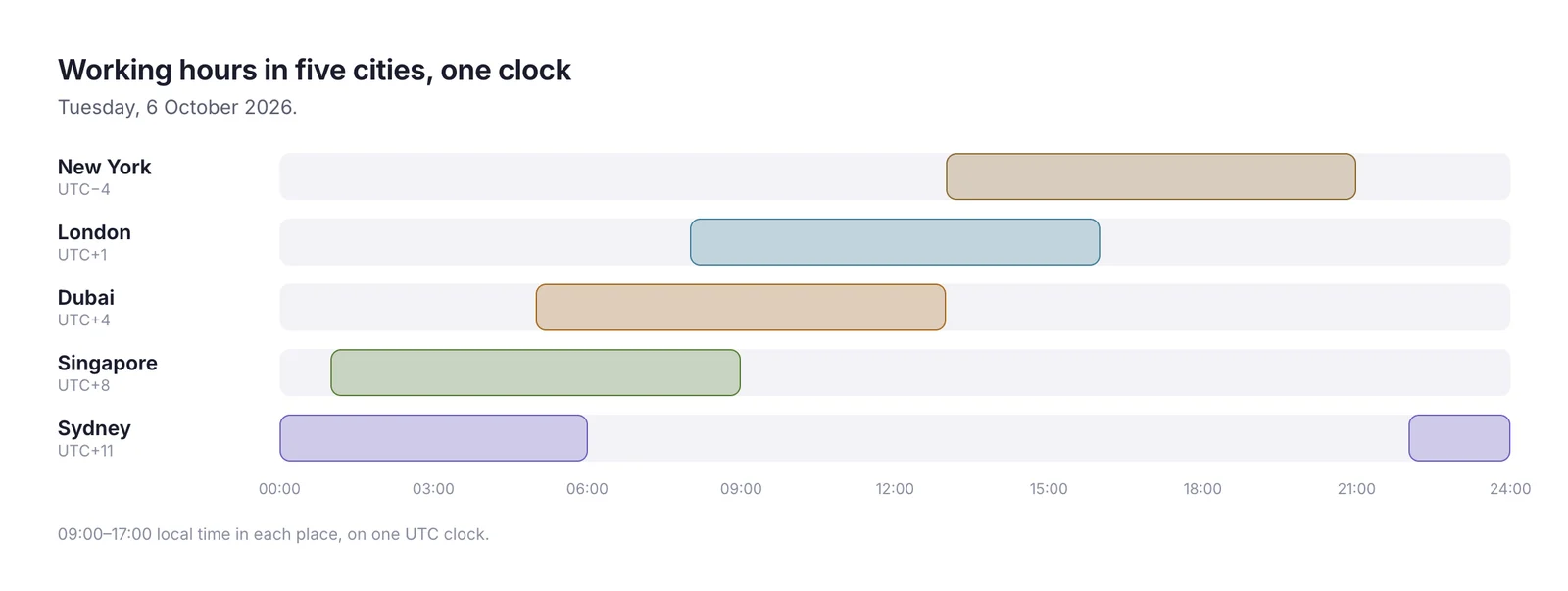
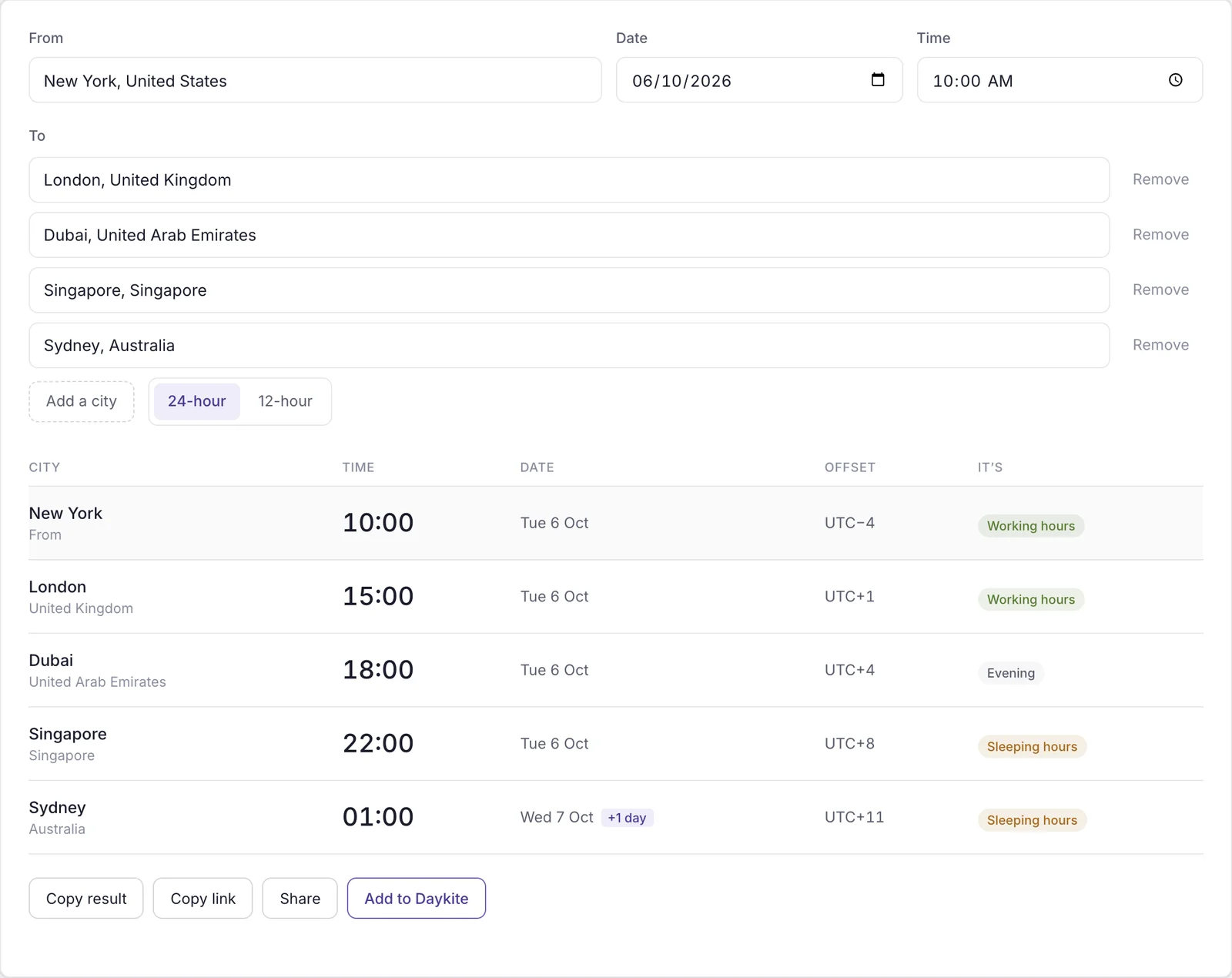
Here's a real conversion. A product review is proposed for 10:00 in New York on Tuesday, 6 October 2026. Attendees are in London, Dubai, Singapore and Sydney.
| City | Local time | Kind of time |
|---|---|---|
| New York | Tue 10:00 | Working hours |
| London | Tue 15:00 | Working hours |
| Dubai | Tue 18:00 | Evening |
| Singapore | Tue 22:00 | Sleeping hours |
| Sydney | Wed 01:00 | Sleeping hours |
Three of five attendees are fine. Singapore and Sydney are not. The converter makes this obvious in seconds — and that's the real value: it shows you a problem before you send the invitation, while there's still time to pick a better slot.
For a group like this, one call rarely suits everyone. How to find the best meeting time across time zones covers what to do when there's no overlap — splitting the meeting, rotating the late slot, or going asynchronous.
Why the same conversion changes during the year
Try the same meeting — 10:00 in New York — on three dates in autumn 2026:
| Date | London | Dubai |
|---|---|---|
| Tue 6 October | 15:00 | 18:00 |
| Tue 27 October | 14:00 | 18:00 |
| Mon 2 November | 15:00 | 19:00 |
What happened?
- On 25 October, the UK moved its clocks back an hour. The US didn't change until 1 November. For that one week, New York and London are four hours apart instead of five.
- On 1 November, the US moved its clocks back. London is five hours ahead again — but Dubai, which doesn't use daylight saving, is now nine hours ahead of New York instead of eight.
Nobody's watch is wrong. The rules are just different in each country, and they change on different weekends. This is exactly why step 3 — setting the real date — matters.
Converting times for a trip
A converter is just as useful when you are the one moving. Before a trip, convert three kinds of time:
- Your recurring meetings. A 16:00 weekly call at home might become 23:00 where you're going. Decide now whether to join, move it for that week, or send an update.
- Your flights. Departure and arrival times are always local to each airport. Converting both to your home time shows how long you're really travelling — and when you'll be exhausted.
- Your first day. If you land at 07:00 local after a night flight, a 09:00 meeting that day is optimistic. Block a lighter first morning.
When you get back, check the same meetings again. If daylight saving changed while you were away, the times you remembered may no longer be right.
Common mistakes
- Converting from your own city instead of the organizer's. Two conversions, twice the chance of an error.
- Using abbreviations. EST vs EDT, CST, IST — use city names.
- Forgetting the date changes. Evening in the Americas is the next morning in Asia and Australia.
- Leaving the date on "today". A meeting in three weeks may land after a clock change.
- Assuming everyone works Monday to Friday. Weekends differ; in Saudi Arabia, for example, the weekend is Friday and Saturday.
- Typing times into the invitation text only. The calendar invitation converts itself; your email text doesn't. Write both: 10:00 New York / 15:00 London.
Taking it further
Once converting is second nature, a few habits make international scheduling smoother:
- Keep a short list of your team's cities so a conversion takes one click.
- Learn your two or three most common gaps, including when they change. For most US–UK teams that's "five hours, except a few weeks in March and late October".
- Use a meeting finder for groups. A converter answers "what time is this for everyone?"; a meeting finder answers "which time works best for everyone?". The free Meeting Time Finder ranks the fairest options.
- Check a city pair's page before a recurring meeting. The New York–London page, for instance, shows the current gap and this year's daylight saving dates.
Where automation helps
Most time-zone work can be taken off your hands entirely:
- Calendar invitations already show each attendee their own local time.
- Booking pages can show your free times in each guest's time zone, so nobody converts anything.
- Travel-aware calendars keep your events right when you change time zones.
How Daykite helps
The free Time Zone Converter converts one time into as many cities as you need, labels each as working hours, early morning, evening or sleeping hours, marks next-day times, and gives you a link to share. For meetings people book with you, Daykite's booking page shows your available times in each guest's own time zone — so a client in Berlin sees Berlin times, and you never convert at all.
Frequently asked questions
How do I convert a meeting time to several time zones at once?
Enter the time in the organizer's city, add every attendee's city, and set the meeting date. A converter such as Daykite's free Time Zone Converter shows all the local times together, with a label for working hours, evening or night.
Why does the time difference between two cities change?
Countries change their clocks for daylight saving on different dates, and some don't change them at all. New York and London are usually five hours apart, but four hours apart for a few weeks each March and late October.
Should I use time zone abbreviations like EST or CST?
Avoid them. EST technically applies only in winter, and CST and IST each mean several different time zones. City names are unambiguous.
How do I show a meeting time for several countries in an email?
Write the time for the main locations, such as 10:00 New York / 15:00 London / 18:00 Dubai, and include a converter link so anyone else can check their own city.
Why does a converter show a different date?
Because the day changes at midnight in each place. A 10:00 meeting in New York on Tuesday is already 01:00 on Wednesday in Sydney. Always check the date column, not just the time.
What's the difference between a time zone converter and a meeting finder?
A converter shows what one chosen time is everywhere. A meeting finder compares everyone's working hours and suggests the times that suit the group best.
time zone converterinternational meetingstime zonesdaylight saving timeremote teams
Comments